
Project memory
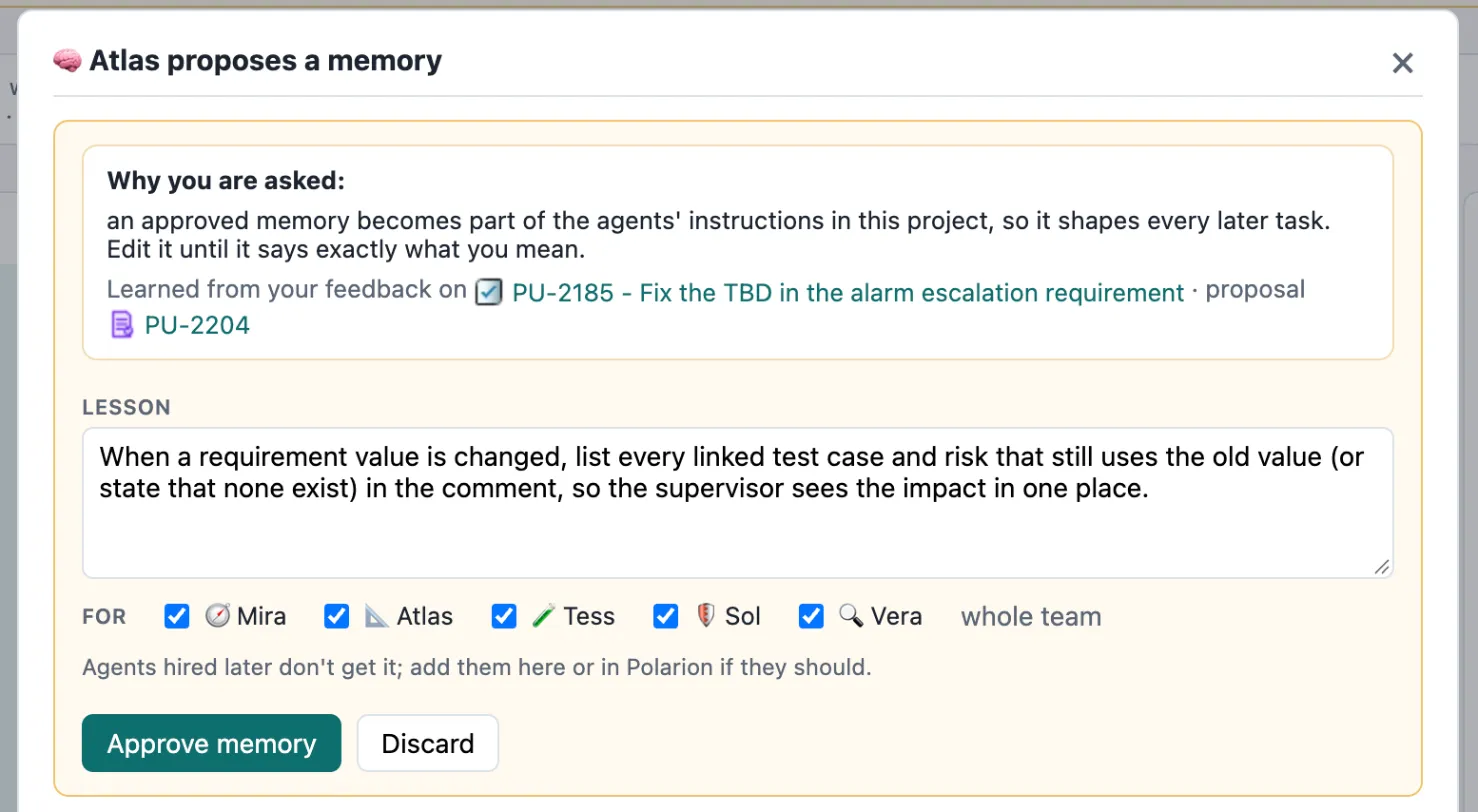
Agents don’t remember between tasks on their own. Project memory changes that, under your control: when you send work back with a rule worth keeping, the agent proposes a short lesson, you approve it, and from then on it is part of the agents’ instructions.
How a memory is born
Section titled “How a memory is born”flowchart LR
F["<b>Send back</b><br/><small>with Teach ticked</small>"]:::you --> P["<b>Proposal</b><br/><small>written by the agent</small>"]:::run
P --> R{"<b>You review</b><br/><small>edit text · pick agents</small>"}:::you
R -- approve --> A["<b>Active</b><br/><small>in the agents' instructions</small>"]:::ok
R -- discard --> X["<b>Retired</b>"]:::mute
A -- retire --> X
X -- reinstate --> A
A --> U["<b>Run record</b><br/><small>lists the memories used</small>"]:::pol
classDef pol fill:#dcecec,stroke:#0d6e6e,stroke-width:1.2px,color:#12302f
classDef run fill:#ece5fb,stroke:#7c3aed,stroke-width:1.2px,color:#2b1d4f
classDef ext fill:#e3ebfb,stroke:#2563eb,stroke-width:1.2px,color:#16264a
classDef you fill:#fdf0d8,stroke:#b7791f,stroke-width:1.2px,color:#4a3210
classDef ok fill:#e3f2e7,stroke:#1f7a3d,stroke-width:1.2px,color:#143d22
classDef bad fill:#fbe4e2,stroke:#b3261e,stroke-width:1.2px,color:#4d1612
classDef mute fill:#f1f4f6,stroke:#8a96a3,stroke-width:1.2px,color:#2a3440
- Send back with Teach. In the decision box, type your feedback and tick 🧠 Teach Atlas from this.
Summaries for me should end with the requirement id in square brackets, so I can paste them into the review minutes.
- The agent fixes the work — and proposes a memory. It turns your specific feedback into a general rule, and decides whether it is about how it works or a convention for the whole team:
End every requirement summary with the requirement id in square brackets, e.g. [PU-2081].
- You review it. 🧠 Review memory ▸ appears in Needs you. Edit the text until it says exactly what you mean, tick which agents get it (or whole team), and Approve — or Discard.
- It takes effect. From the next run on, the chosen agents find the lesson in their instructions under “Lessons from your supervisor”.
Who gets a memory
Section titled “Who gets a memory”A memory’s For agent field lists the agents that get it. “Whole team” means the agents hired at that moment — agents hired later don’t get it automatically. That is deliberate: a new agent starts clean. Add it to a memory if it should.
Memories belong to the project where they were learned. A lesson about your project’s conventions never leaks into another project, even if the same agent works there. Lessons that hold everywhere belong in a skill.
The memory work item
Section titled “The memory work item”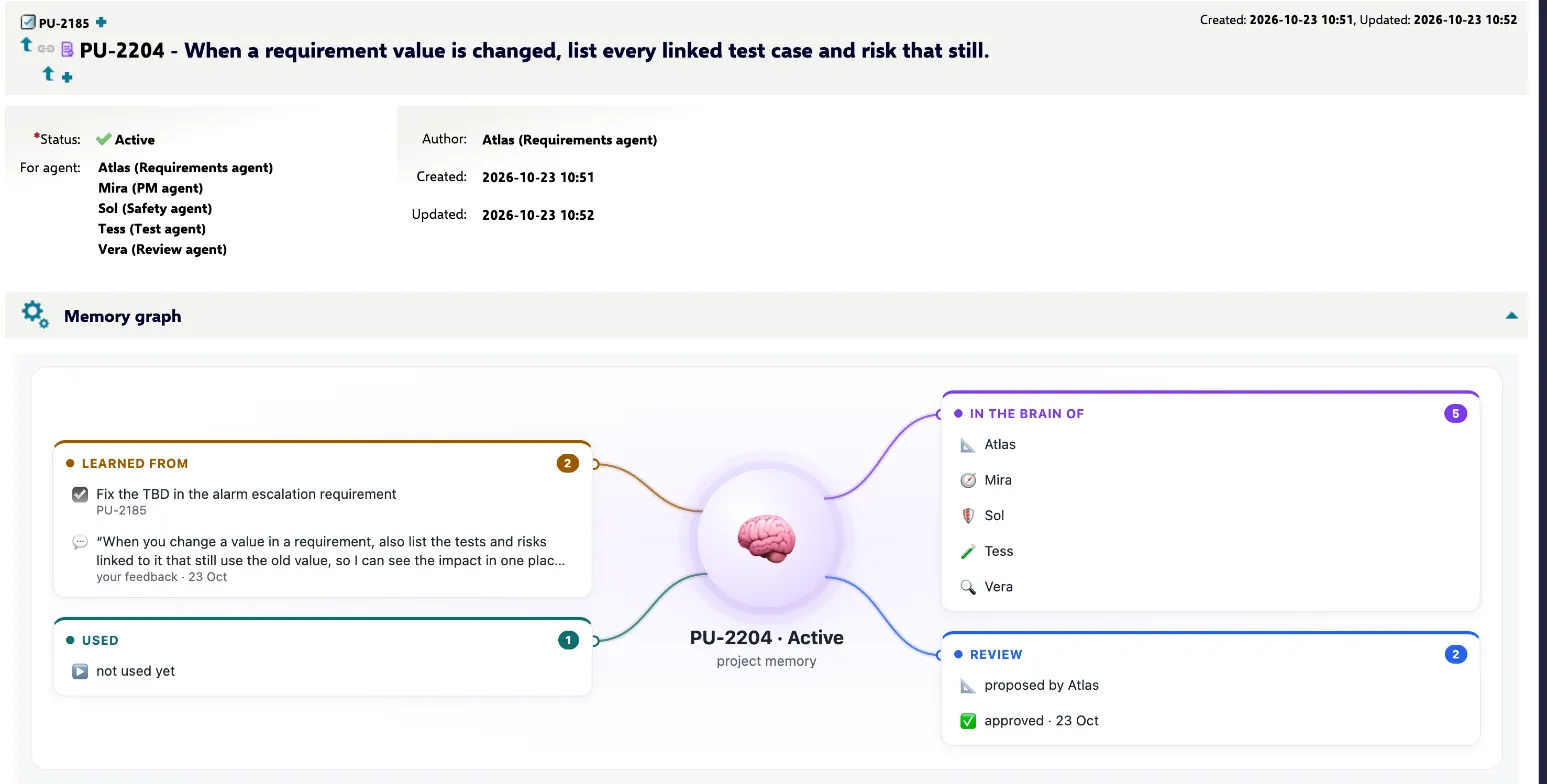
Each memory is a work item of type Agent Memory (aiMemory) in your project:
| Field | |
|---|---|
| Status | Proposed → Active (approved) → Retired |
| For agent | The agents whose instructions include it |
| Author | The agent that proposed it |
| Description | The lesson |
| learned from | Link to the task where you gave the feedback |
| Comments | “✅ Memory approved for … by …” — the decision on record |
Its Memory graph panel shows where it sits: the feedback it was learned from, the agents that have it, and how many runs it shaped.
Manage memories
Section titled “Manage memories”- An agent’s ⚙ → Memories shows how many memories are in its instructions, with Show in Polarion ↗ to list them.
- To stop a memory, open it and use the workflow action Retire. Reinstate brings it back.
- Many memories make instructions long; the menu suggests tidying up when an agent has more than 15.