
Connections (MCP servers)
A connection lets agents use another system, such as GitHub, GitLab or a design tool, through its MCP server. Agents never call these servers directly. Every call goes through the MCP gateway in the Agent Runner, which checks your policy, the project’s scope and the approvals before anything runs, and records the call on the agent’s run. See Gateway for the details.
Connections are work items of type MCP Connection in the Agent Pool.
Who gets which connection
Section titled “Who gets which connection”An agent can use a connection in a project only when all of these are true:
- The pool agent has a uses link to the connection (capability).
- The connection is Active (reviewed and approved).
- The project granted it when hiring the agent (the Connections step of the hire wizard).
- A credential for it is stored in the runner.
- For scoped connections: the project has a scope for it (see below).
If any of these is missing, the agent doesn’t see the connection’s tools at all.
GitHub and GitLab from the Bullpen
Section titled “GitHub and GitLab from the Bullpen”The release’s catalog, the Agent Bullpen, contains two ready-made connections: GitHub (the official GitHub remote MCP server: repositories, pull requests, actions, and git through the gateway) and GitLab.com (the official GitLab MCP server, also with git through the gateway). Hiring one from Agency → Bullpen creates the connection as a draft with its server URL, authentication type, the name of the credential to set, and its scope and git settings — but without a credential and without a tool list. Then:
- Set the credential under that name in Administration → Credentials (Connected systems).
- Open the connection and run Check server now on its MCP server panel to discover the tools.
- Review the tool policy. The catalog’s decisions for this server (which tools are blocked, which wait for a person) are written into the connection’s description; apply them as you review.
- Submit and approve the connection like any other (see Connection lifecycle).
Any other MCP server you register yourself, as described next.
Registering a server
Section titled “Registering a server”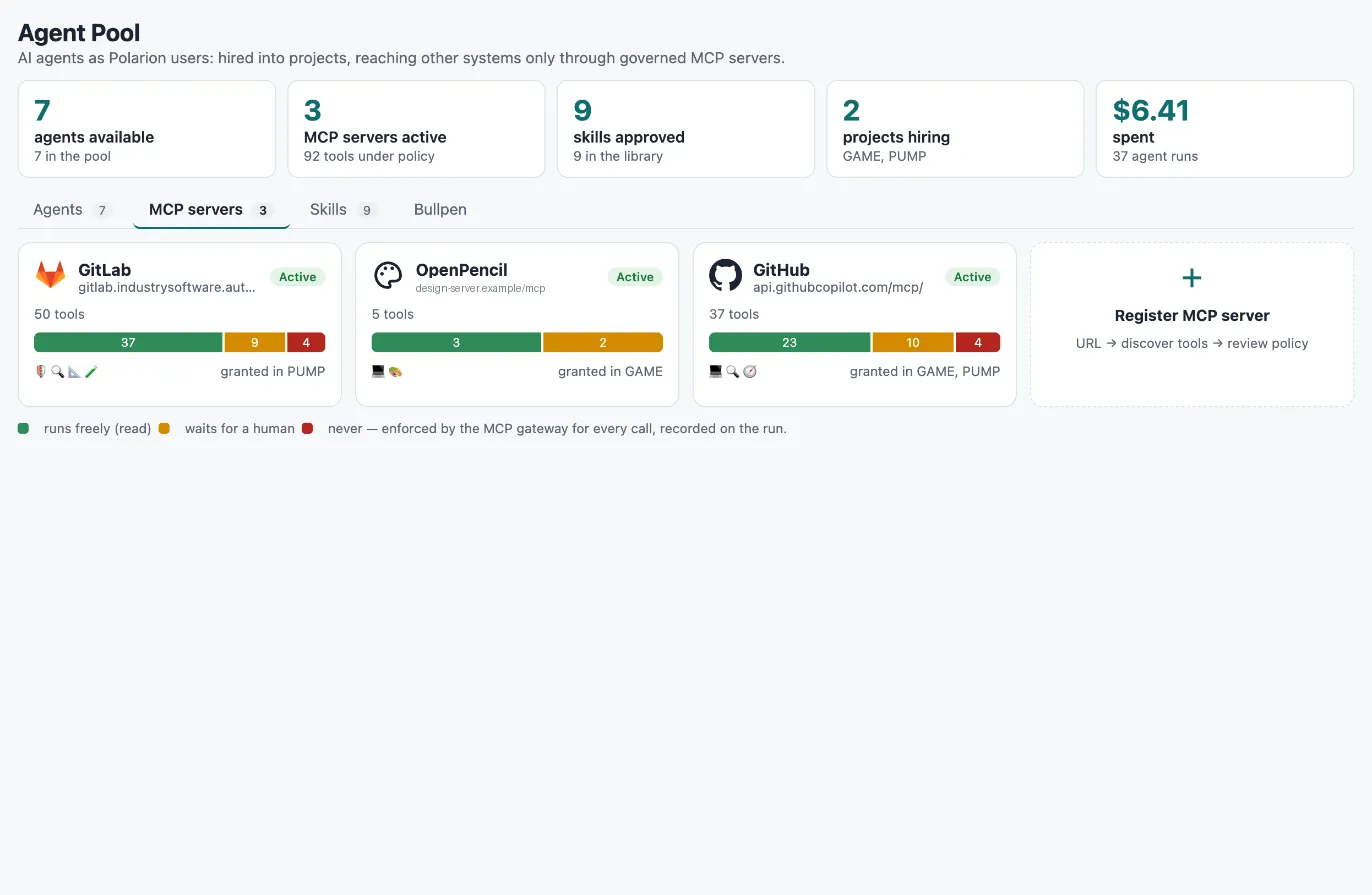
- Open Agency → MCP servers and choose Register MCP server.
- Enter the server URL (streamable HTTP) and the authentication: none or a bearer token.
- Choose Discover tools. The runner asks the server for its tools and suggests a policy for each from the server’s own hints: read-only tools run freely, destructive tools are blocked, everything else waits for a human. Tools without hints wait for a human.
- Adjust the policy per tool (Allow, Ask, Block) and give the connection a name.
- Choose Create connection (draft).
A token you enter is stored encrypted in the runner’s secret store. It is never shown again and never written to Polarion; the connection only keeps the secret’s name.
The tool policy
Section titled “The tool policy”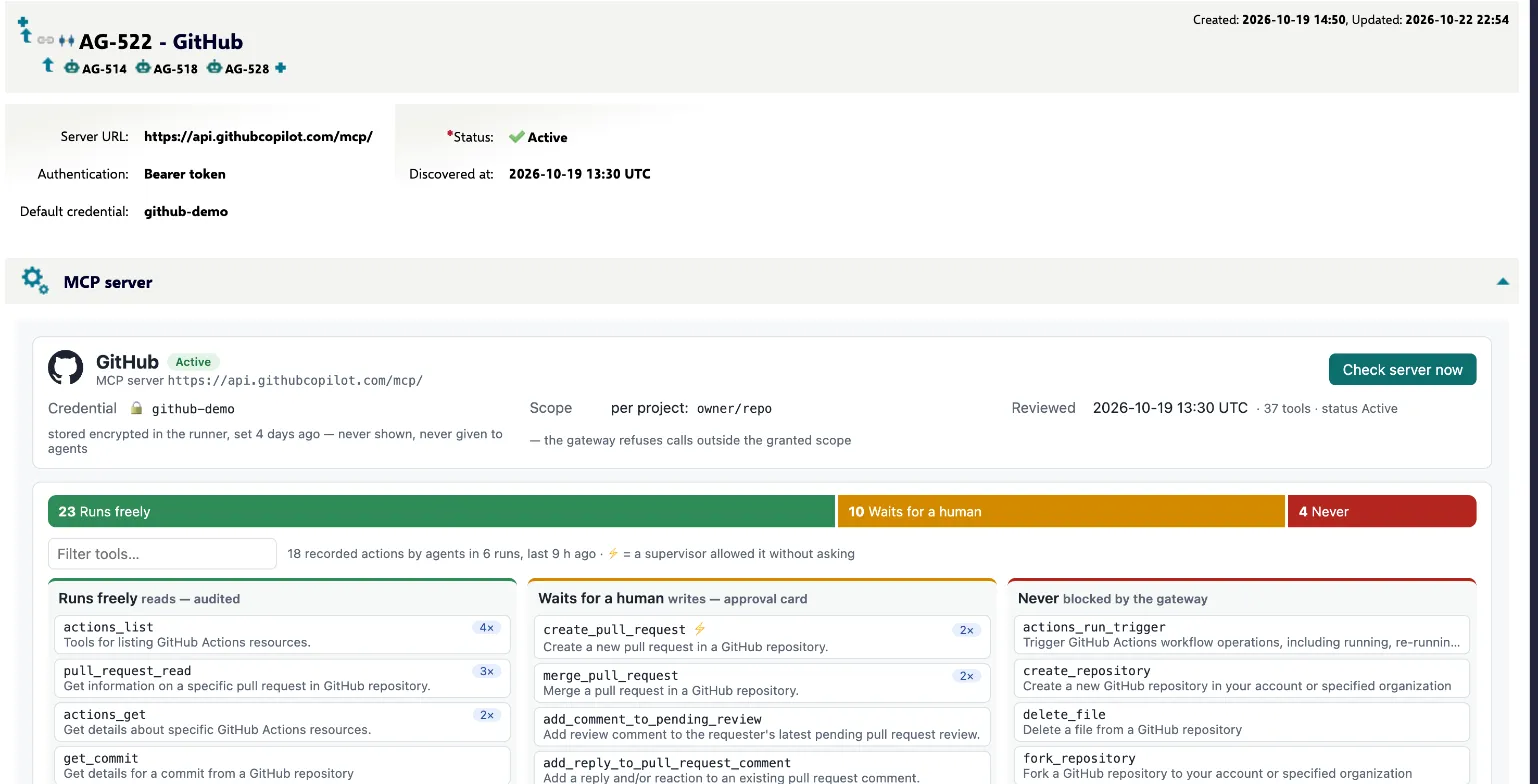
| Policy | Shown as | What happens when an agent calls the tool |
|---|---|---|
read |
Runs freely | The call runs and is recorded. |
approve |
Waits for a human | The call is held with its exact arguments and the agent’s reason. It runs only after a person approves it. |
block |
Never | The call is refused and recorded as a blocked attempt. |
The policy is stored on the connection as JSON in the Tool policy field: per tool its description, input schema, read-only and destructive hints, and the policy. Agents only ever get these reviewed definitions, never what the server says at the moment of the call.
Connection lifecycle
Section titled “Connection lifecycle”stateDiagram-v2 direction LR [*] --> Draft Draft --> Review: submit Review --> Active: approve Review --> Draft: send back Active --> Disabled: disable Disabled --> Active: enable Disabled --> Draft: rework Review: In security review classDef ok fill:#e3f2e7,stroke:#1f7a3d,color:#143d22 classDef you fill:#fdf0d8,stroke:#b7791f,color:#4a3210 classDef mute fill:#f1f4f6,stroke:#8a96a3,color:#2a3440 class Active ok class Review you class Draft,Disabled mute
| Status | Meaning | Actions |
|---|---|---|
| Draft | Registered, not usable. | Submit for security review → In security review |
| In security review | Waiting for a reviewer. | Approve (activate) → Active, Send back → Draft |
| Active | Can be granted and is served by the gateway. | Disable → Disabled, Rework → Draft |
| Disabled | Switched off. | Enable → Active, Rework → Draft |
Disabling takes effect on the next agent run: the gateway serves only active connections. Use it when a system misbehaves or a credential leaked.
After activation, link the agents that should be able to use it (uses link from the agent), and project leads can grant it at the next hire.
Connection fields
Section titled “Connection fields”| Field | Meaning |
|---|---|
| Server URL | The MCP endpoint. |
| Authentication | None, Bearer token, or Key in the URL (the secret is the whole server URL). |
| Default credential | Name of the secret in the runner’s secret store. |
| Tool policy | The reviewed tools and their policy (JSON). |
| Discovered at | When the tool list was last reviewed. |
| Scoped per project | The system’s data is partitioned (repositories, projects) and each project sets a scope. |
| Scope arguments | Tool arguments that carry the scope, e.g. project_id, id, url. owner/repo joins two arguments. |
| Scope hint | What a scope looks like, shown when hiring, e.g. group/project. |
| Scope discovery | Optional: which tool lists real scope values, so agents can offer them as choices. |
| Extra headers | Extra request headers as JSON, if the server needs them. |
| Git remote, Git credential style, Git push branches | Plain git through the gateway (see below). |
Scopes
Section titled “Scopes”For a scoped connection, the hire wizard asks for the scope in this project, for example one repository. The gateway then refuses every call whose scope arguments name anything else. If the project leaves the scope empty, the connection is locked: the agent asks its supervisor the first time it needs it, and the answer is saved on the engagement and unlocks it. The choices offered with that question come only from the connection’s scope discovery, never from the agent’s guesses; without discovery the supervisor types the answer.
Git through the gateway
Section titled “Git through the gateway”For code hosts you can let sandbox agents use plain git. Set on the connection:
- Git remote: a URL template with
{repo}, e.g.https://github.com/{repo}.git. - Git credential style:
basic:x-access-token(GitHub),basic:oauth2(GitLab) orbearer. - Git push branches: branch patterns agents may push to. Default:
agent/*, feature/*.
The gateway adds the credential on the way out, so it never enters the sandbox. Clone and fetch are allowed within the scope. Pushes go only to the allowed branches, branch deletions are refused, and merging stays a tool call that waits for approval. Every fetch, push and refusal goes into the run’s record.
Tool drift
Section titled “Tool drift”MCP servers change. Before it gives an agent a server’s tools, the runner compares the server with its reviewed policy. A result is reused for up to 15 minutes; Check server now on the connection’s MCP server panel checks right away:
- Tools the server added are listed for review and never offered before a person adopts them.
- Tools the server changed (description, inputs, read/write hints) or dropped are held: agents don’t get them until a person reviews the policy again.
In the panel you choose a policy for each new or changed tool (or keep it held) and Save reviewed policy. The change is written as you, with a comment “Tool policy re-reviewed”, so Polarion’s history is the audit trail. The Agency shows “N held for review” on the server’s card.
Credentials
Section titled “Credentials”Credentials live encrypted in the runner’s secret store (PocketBase, encrypted with the bootstrap secret file
secret_key). The store is write-only from the browser: views can see whether a secret is set, when and by whom,
but never its value. Connection credentials appear in Administration → Credentials under Connected systems, next to
the model key and the agent tokens; to rotate one, see Credentials and
Operations.
Registering sample connections by script
Section titled “Registering sample connections by script”For a sample set, scripts/seed_connections.py in the runner registers the connections defined in the script: it
discovers their tools, applies the suggested policy plus the decisions written in the script, keeps policies an
admin has changed since, walks each connection to Active, links the agents that use it and stores the
credential through the runner’s API. It is optional; the wizard in Agency → MCP servers does the same by
hand. Adapt the definitions to your systems before you run it.