
Sandboxes
Some work needs a real computer: cloning a repository, building, running tests. Agents with the Claude Code or Codex harness get one: a sandbox, an isolated container for each task they work on. The sandbox is managed by OpenSandbox, an optional component next to the Agent Runner.
How a sandbox lives
Section titled “How a sandbox lives”- One sandbox per task. It is created on the agent’s first run on the task.
- Paused between runs. After each run the runner pauses it. The next run on the task (an answer from the supervisor, an approval, a finished sub-task) resumes it with the same files and continues the agent’s session.
- Expires after
SANDBOX_HOURS(default 24 hours). - Deleted by an administrator in Administration → Sandboxes when needed. Deleting loses the files; the task’s next run starts a fresh sandbox.
Inside, the agent works as an unprivileged user in /workspace, with a shell, git, Node.js, Python and ripgrep.
What a sandbox can reach
Section titled “What a sandbox can reach”The network is closed by default. A sandbox can reach only:
| Destination | Why |
|---|---|
| The runner’s sandbox entrance | The MCP gateway (and git through the gateway). Nothing else of the runner is reachable. |
| The model provider’s host | To talk to the model. |
Hosts in SANDBOX_ALLOW |
Anything you add for all sandboxes, e.g. a package mirror. |
| The engagement’s internet sites | Domains a project lead allowed when hiring, with their subdomains. |
Internet sites are set per engagement in the hire wizard, one domain per line; empty means no internet. They are applied again on every run, so changes take effect at the next run.
The internet is read-only
Section titled “The internet is read-only”A sandbox may read the sites it is allowed to reach, but never send anything to them. The egress proxy answers
every request other than GET, HEAD and OPTIONS with “403 blocked”. Exceptions are the model host and
private addresses (the runner’s entrance). Anything that changes another system must go through the gateway,
where the tool policy and approvals apply.
For Claude Code, web fetching is switched on only when the engagement allows sites, and web search is always off.
Pages read with web fetch or curl/wget are recorded in the run ledger as “Web” reads.
No credentials inside
Section titled “No credentials inside”- Model key: the sandbox holds a placeholder. OpenSandbox’s credential vault adds the real key to requests to the model host on the way out.
- Connected systems: tools go through the gateway with a run token that expires with the run.
- Git: remotes of granted connections are rewritten to the gateway, which adds the credential and enforces scope and push branches. The run token is removed from git’s configuration after each run. Commits are authored as “Agent name (AI agent)”.
Limits
Section titled “Limits”| Setting | Default | Meaning |
|---|---|---|
SANDBOX_CPU |
1 |
CPU per sandbox. |
SANDBOX_MEMORY |
2Gi |
Memory per sandbox. |
SANDBOX_MAX |
3 |
Running (not paused) sandboxes at the same time. A run that would start one more fails. |
SANDBOX_HOURS |
24 |
Lifetime of a sandbox. |
MAX_STEPS_PER_RUN |
40 |
Turns per run (also for the built-in loop). |
The engagement’s remaining budget caps each Claude Code run. Codex has no in-run cost limit: its budget is checked before each run, and the turn limit bounds a run. See Budgets.
Watching sandboxes
Section titled “Watching sandboxes”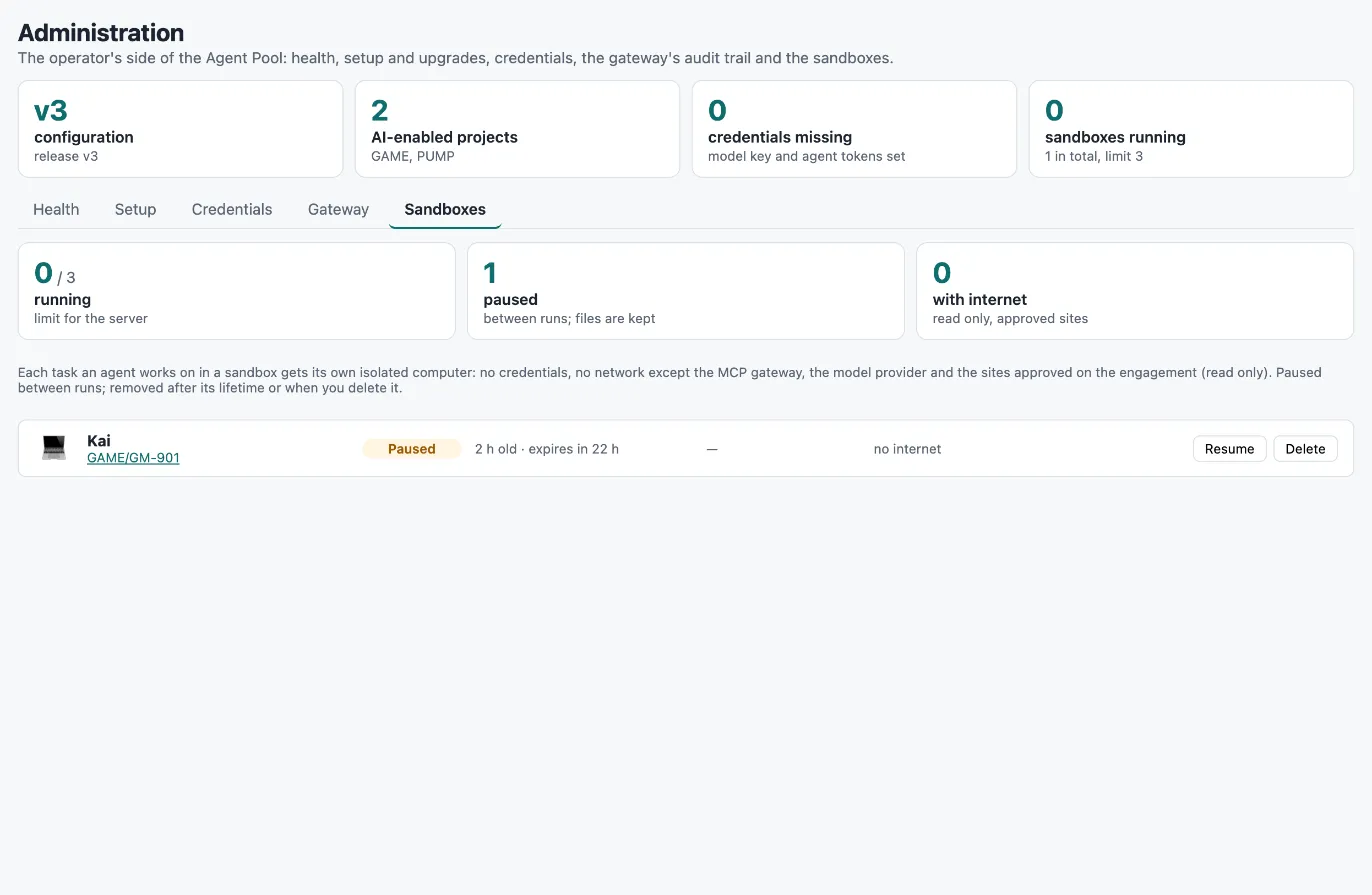
Administration → Sandboxes shows every sandbox: agent and task, state (running, paused), age and expiry, memory and
CPU use, allowed sites, the commands the agent ran, and a read-only view of the files in /workspace. You can
pause, resume or delete a sandbox there.
Each sandbox run also records on its Agent Run item: the sandbox id and image, the commands, the web pages read, the allowed sites and the budget cap. The AI audit report lists these runs separately.
Setting up OpenSandbox
Section titled “Setting up OpenSandbox”- Run the OpenSandbox server on the same host as the Agent Runner (it starts containers through the host’s Docker). Keep its API on localhost and protect its configuration file, which holds the API key.
- Build the two images from the
opensandbox/folder:workspace/: the agent’s computer (Node.js, git, Python, Claude Code, Codex, useragent). Configure its tag asSANDBOX_IMAGE.egress/: OpenSandbox’s egress sidecar plus the read-only rule. SetAGENTIC_WRITE_HOSTSto your model host, and configure the image as the egress image in OpenSandbox’s configuration.
- Give the runner
OPENSANDBOX_URLandSANDBOX_EDGE_HOSTinagentic.env— the address on the Docker bridge where sandboxes reach the runner (its port isSANDBOX_EDGE_PORT, default 8081) — and put the OpenSandbox API key into the bootstrap secret filesecrets/opensandbox_api_key(see Credentials). Restart the runner.
Sandboxes are enabled only when the opensandbox_api_key file is not empty and SANDBOX_EDGE_HOST is set.
Without them, agents with a sandbox harness run in the runner’s built-in loop.