
Agent Bullpen
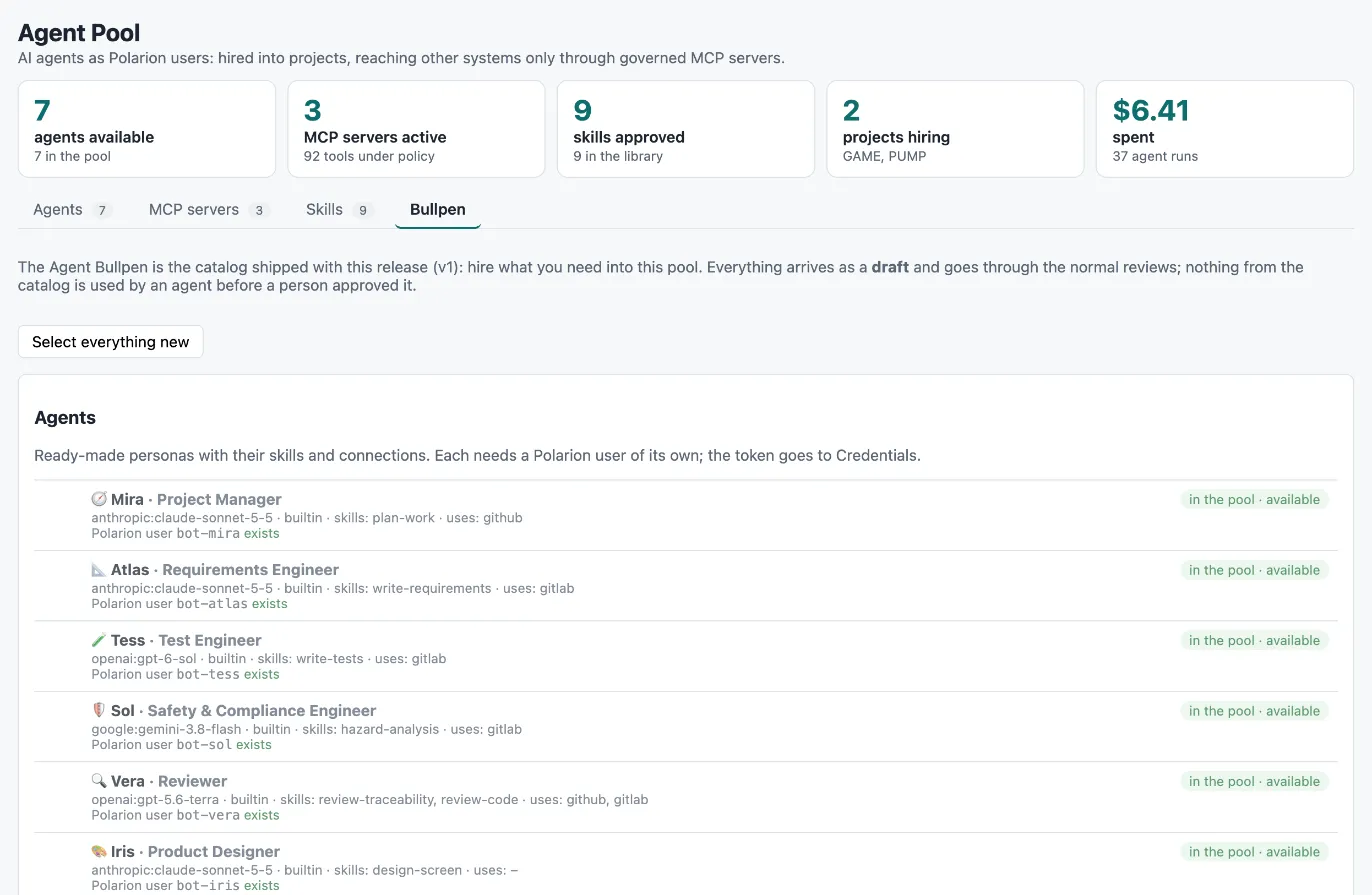
The Agent Bullpen is the catalog of ready-made skills, agents and connections that ships with every release. It is the quickest way to fill a new Agent Pool: you pick what you need, and the Bullpen creates it in the pool as drafts, as you. Nothing from the catalog is used by an agent before a person has reviewed it — the same skill, agent and connection workflows apply as for anything you write yourself.
Open the pool project and choose Agency → Bullpen. The page compares the catalog with the pool: every entry shows either not hired or in the pool · <status>, so you can see at a glance what is still missing and what is already published.
What the catalog contains
Section titled “What the catalog contains”The catalog has its own version, shown at the top of the page. Its contents today:
9 skills — plan-work, write-requirements, write-tests, hazard-analysis, review-traceability,
design-screen, implement-web, review-code and code-traceability, each with its instructions and the
Polarion tools it needs.
7 agents — each with a persona, a model, a harness, its skills, the connections it uses and a suggested Polarion user id:
| Agent | Role | Polarion user |
|---|---|---|
| Mira | Project manager | bot-mira |
| Atlas | Requirements engineer | bot-atlas |
| Tess | Test engineer | bot-tess |
| Sol | Safety & compliance engineer | bot-sol |
| Vera | Reviewer | bot-vera |
| Iris | Product designer | bot-iris |
| Kai | Web developer | bot-kai |
2 connections:
| Connection | Server | What agents get |
|---|---|---|
| GitHub | The official GitHub remote MCP server | Repositories, pull requests and actions; plain git through the gateway |
| GitLab.com | The official GitLab MCP server | Projects, issues and merge requests; plain git through the gateway |
The catalog’s policy decisions for a connection — which GitHub tools are blocked, which wait for a person — come with the entry, see Connections from the catalog below.
From catalog to hireable
Section titled “From catalog to hireable”flowchart LR C["<b>Catalog</b><br/><small>ships with the release</small>"]:::run --> B["<b>Agency → Bullpen</b><br/><small>tick · Hire into the pool</small>"]:::you B --> D["<b>Drafts in the pool</b><br/><small>skills · agents · connections, as you</small>"]:::pol D --> S["<b>Skills</b><br/><small>submit → approve</small>"]:::you D --> A["<b>Agents</b><br/><small>publish</small>"]:::you D --> K["<b>Connections</b><br/><small>credential · Check server now · review</small>"]:::you S --> H["<b>Hireable</b><br/><small>Agent Team page</small>"]:::ok A --> H K --> H classDef pol fill:#dcecec,stroke:#0d6e6e,stroke-width:1.2px,color:#12302f classDef run fill:#ece5fb,stroke:#7c3aed,stroke-width:1.2px,color:#2b1d4f classDef ext fill:#e3ebfb,stroke:#2563eb,stroke-width:1.2px,color:#16264a classDef you fill:#fdf0d8,stroke:#b7791f,stroke-width:1.2px,color:#4a3210 classDef ok fill:#e3f2e7,stroke:#1f7a3d,stroke-width:1.2px,color:#143d22 classDef bad fill:#fbe4e2,stroke:#b3261e,stroke-width:1.2px,color:#4d1612 classDef mute fill:#f1f4f6,stroke:#8a96a3,stroke-width:1.2px,color:#2a3440
When a newer release changes the catalog
Section titled “When a newer release changes the catalog”The Bullpen compares every hired skill and agent with the catalog of the installed release. When the catalog entry changed — a skill’s instructions or tools, an agent’s persona, model, harness, role, capacity or rate card — the row says catalog changed: … with the fields that differ, and gets a checkbox. Update N from the catalog writes the new definition as you: an agent is changed in place, an approved skill is sent back to draft first so the new instructions go through the skill review again before any agent uses them. Select everything new and changed picks both the missing entries and the outdated ones.
Connections are never updated automatically: their tool policy was reviewed by a person. A connection whose server URL, authentication, credential name or scope differs from the catalog is marked differs from catalog, and you decide on the connection item what to take over.
Before you start: configuration version 2
Section titled “Before you start: configuration version 2”Items hired from the catalog carry a Catalog id field, which is new in configuration version 2. Open Administration → Setup first: the pool and every AI-enabled project still on version 1 are marked v1 → v2 with an Upgrade button. Apply the upgrade before you use the Bullpen. See Enable a project.
Hire into the pool
Section titled “Hire into the pool”- Tick the entries you want. Select everything new ticks everything that is not in the pool yet.
- Click Hire N into the pool.
Everything is created as you and as a draft:
| Kind | What the draft contains |
|---|---|
| Skill | The instructions and the Polarion tools. |
| Connection | Server URL, authentication type, the name of the credential to set, scope settings and git settings. No credential and no tool list yet. |
| Agent | Persona, model, harness, capacity and rate card; linked has skill → its skills and uses → its connections; bound to its Polarion user. |
For each agent the page checks whether its Polarion user (for example bot-mira) exists and offers to create it.
An administrator still assigns the user’s licence and creates its personal access token, which goes into
Administration → Credentials (see Agent Pool).
Items that were in the pool before you used the Bullpen and match a catalog entry by name are recognised — a connection only when its server URL matches too — and get their catalog id when you hire. They are not changed otherwise.
Reviews stay as they are
Section titled “Reviews stay as they are”A draft from the catalog is reviewed like any other draft. The Bullpen only saves you the clicks:
- Approve and publish N drafts walks the hired skills through submit → approve and the hired agents through publish, as you. Polarion’s history records each step under your name.
- Connections stay drafts until an administrator has done two things: set their credential in Administration → Credentials and run Check server now on the connection’s MCP server panel to discover its tools. Then the connection is submitted and approved like any other.
Connections from the catalog
Section titled “Connections from the catalog”The catalog comes with policy decisions for its connections, for example which GitHub tools are blocked and which need a person’s approval. Because the tool list is discovered from your server, those decisions are not applied automatically: they are written into the connection’s description, and the reviewer applies them when reviewing the discovered tools. That keeps the rule that agents only ever get a tool policy a person has reviewed against the real server. See Connections and The tool policy.
Catalog versions
Section titled “Catalog versions”The catalog is versioned with the release and its version is shown on the Bullpen page. Hiring from a newer catalog adds entries that are new; items you hired earlier keep the definition they have in the pool. Updating them from the newer catalog is not available yet (see the note at the top).