
Operations
Day-to-day running of the platform is mostly quiet: the runner polls Polarion, starts runs and records them. This page lists what you check and change as an administrator.
Health and status
Section titled “Health and status”Endpoint (under /agentic-runner/) |
Answers |
|---|---|
GET /health |
{"ok": true} when the runner is up. Use it for monitoring. |
GET /status |
Version, Polarion URL, pool project, available model providers (none without a model key), the agents that have a token, whether PocketBase is connected, and the tasks running right now. |
Who may change things
Section titled “Who may change things”The Administration page is visible to everyone who can read the Agent Pool project, but only its project
administrators (Polarion role project_admin, or a global admin) can set credentials, register and re-review MCP
servers, run the field test and stop sandboxes. Others see the page marked “Read only” and the runner refuses their
writes. See Security → Who may administer.
Administration → Health
Section titled “Administration → Health”The same checks an operator would run by hand, live on a page: the configuration version of the pool and every AI-enabled project (against this release), the model gateway, Polarion and the agents’ tokens, PocketBase, every MCP server with its tool drift, and the sandbox service. Run field test goes one step further and really exercises each part: it writes and reads a PocketBase record, makes a one-token model call, knocks on the MCP gateway without a run token (which must be refused), and creates a sandbox, runs a command in it with the internet denied and removes it again — about half a minute, nothing is left behind.

Preflight check
Section titled “Preflight check”GET /preflight runs read-only checks and answers each with ok, warn or fail and one line of detail. Call it with
an administrator’s personal access token in the X-Polarion-REST-Token header. It needs access to the Agent Pool
project.
| Check | What it verifies |
|---|---|
| Model | Agents run on their own configured models. |
| Model gateway | The model key from Administration → Credentials is set and accepted (one tiny model request; the only paid call). |
| Polarion admin token | The runner’s admin token (bootstrap secret file) can read the pool project. |
| Bot tokens | Every agent in the pool has a token in Administration → Credentials and can sign in with it; agents without one or with a token that no longer works are named. |
| PocketBase | The operational store answers. |
| MCP servers | Every active connection answers, and its tools match the reviewed policy (otherwise: how many are held or new). |
| Sandboxes | OpenSandbox is configured and reachable. |
The response also contains checks of a sample project setup; for your own projects, focus on the checks above. Fix every fail before you rely on the agents. Missing credentials are also marked red in Administration → Credentials, where you set them.
- Runner:
docker compose logs -f runner. One line per run start and end (agent, task, outcome, cost), watcher and approval errors, and tool drift warnings. - PocketBase:
docker compose logs -f pocketbase. - Per run: the Agent Run item in the project holds the step log, the run ledger, the gateway call table and the full transcript. This is usually where you look first when an agent did something unexpected.
- Live: the Agent Team page and the task’s AI Agent panel follow running agents as they work.
Deploying updates
Section titled “Deploying updates”- Polarion app: upload the release’s
agentic-app-<version>.zipagain in Global Administration → Applications. Browsers may keep the old view; reload the page (or the view’s frame) after an update. - Runner and PocketBase:
AGENTIC_VERSION=<version> docker compose -f docker-compose.yml -f docker-compose.release.yml up -dpulls the released images (or rebuild from the sources with… up -d --build). PocketBase applies new migrations on start. Releases are versioned together with the configuration manifest, so after an update Administration → Setup shows which projects need the upgrade. - Project configuration: open Administration → Setup in the Agent Pool (a pool from before configuration version 3 first offers to add the Administration entry on its Agency page, see Installation). The pool and every AI-enabled project that is on an older configuration version are marked; Upgrade adds the new fields, types, forms, workflows and pages, as you. Check repairs a project whose configuration was changed by hand. See Enable a project.
Runs that are in progress when the runner restarts are not resumed. The watcher sees the open tasks on its next pass; if a task stalls, a comment on it wakes the agent again.
Backups
Section titled “Backups”| Store | What it holds | Backup |
|---|---|---|
| Polarion | The system of record: agents, skills, connections and their policies, engagements (budgets, grants, standing rules), tasks, runs, ledgers, transcripts, memories, everything agents create. | Your normal Polarion backup. |
PocketBase (pb_data volume) |
Operational state: the encrypted secret store (model key, agent tokens, connection credentials), held and decided approvals, a copy of standing rules, chats, live events, watcher state. | Back up the volume. |
Secret file secret_key |
The key that decrypts the stored credentials. | Keep it in your secret management, separate from the PocketBase backup. |
| The other secret files | admin_token, pocketbase_admin_password, opensandbox_api_key (see Credentials). |
Your secret management; they can be re-issued. |
Reviewing tool drift
Section titled “Reviewing tool drift”The runner compares every active MCP server with its reviewed tool policy before agents use it. Changed or dropped tools are held from agents; new tools are never offered unreviewed.
- Agency → MCP servers shows “N held for review” or “N new on the server” on a server’s card.
- The preflight check lists drift per server.
- To review, open the connection, choose Check server now in the MCP server panel, set a policy for each changed or new tool (or keep it held), and Save reviewed policy.
See Connections.
Rotating credentials
Section titled “Rotating credentials”Operational secrets rotate in Administration → Credentials without a restart; bootstrap secrets are files, replaced with a restart. See Credentials.
| Credential | How to rotate |
|---|---|
| Agent token | Create a new personal access token for the agent’s Polarion user (the row links to the page), Replace it in Administration → Credentials and Test. The agent uses it on its next run. Then revoke the old token in Polarion. |
| Model key | Replace it in Administration → Credentials and Test. New runs use the new key; delete existing sandboxes so they are recreated with it. |
| Connection credential | Replace it in Administration → Credentials (group Connected systems), or store it under the same secret name with the runner’s POST /secrets (body name, value; caller needs access to the Agent Pool project). The next run uses it. Then revoke the old one in the connected system. |
| Runner admin token | Create a new token for the runner’s administrator user, replace the file secrets/admin_token, restart the runner, then revoke the old token. |
| PocketBase superuser password | Change it in PocketBase, replace the file secrets/pocketbase_admin_password, restart the runner. |
| OpenSandbox API key | Change it in OpenSandbox, replace the file secrets/opensandbox_api_key, restart the runner. |
secret_key |
Changing it makes all stored credentials unreadable. Replace the file, restart, and set every credential again in Administration → Credentials. |
Stored credentials are write-only: there is no way to read a value back, only whether it is set, when and by whom. Every change is made as the administrator who pastes it and recorded with their name and time.
Stopping agents
Section titled “Stopping agents”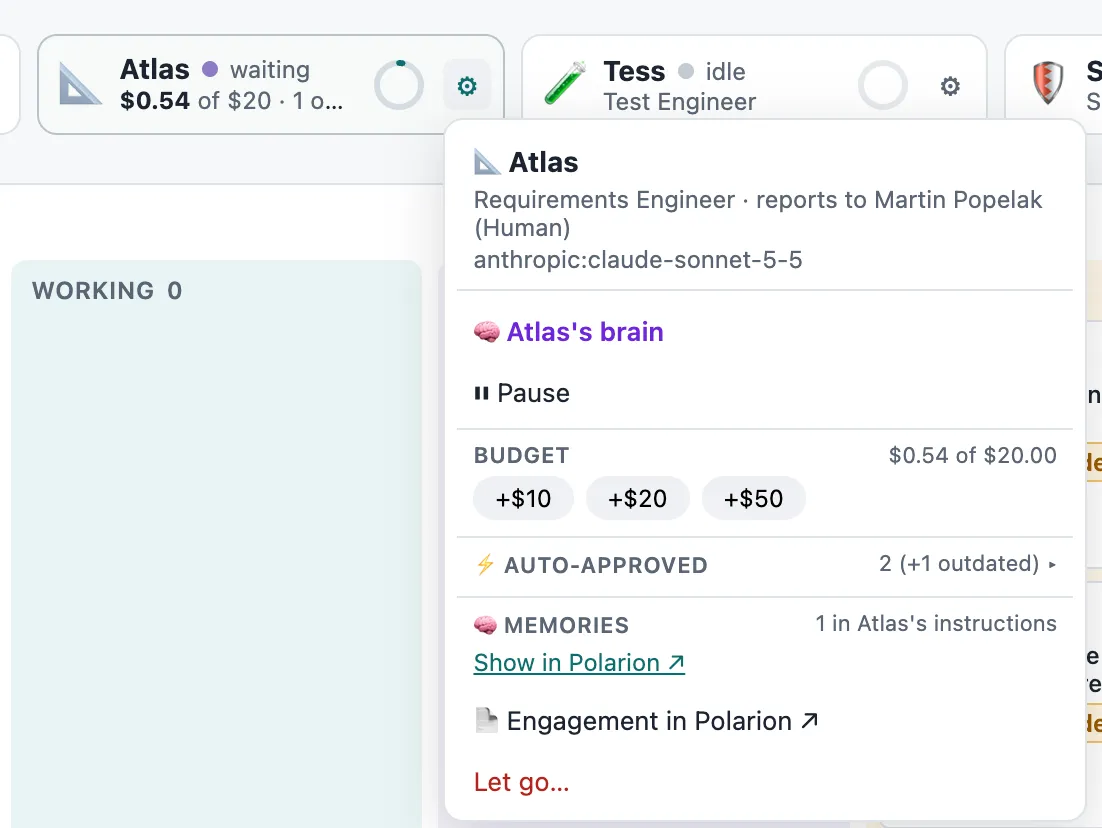
| To stop | Do this | Effect |
|---|---|---|
| One agent in one project | Pause in the agent’s menu on the Agent Team page | No new runs until resumed. |
| One agent in one project, for good | Let go on the Agent Team page | Engagement ended, project roles removed. |
| A connected system | Disable the connection | Its tools disappear from the next runs. |
| A skill | Rework or Retire it | It leaves agents’ instructions at the next run. |
| Everything | Stop the runner (docker compose stop runner) |
No runs start. |