
Budgets
Every hire comes with a budget in US dollars. It is a hard cap for what that agent may spend on model calls in that project. When it is used up, the agent stops and waits for a person. Nothing keeps running in the background.
Where budgets live
Section titled “Where budgets live”The budget belongs to the engagement, the work item that records an agent’s hire into a project:
| Field | Meaning |
|---|---|
| Budget (USD) | The cap for this agent in this project. |
| Spent (USD) | What the agent’s runs and chats have cost so far. The runner adds each run’s cost. |
The same agent hired into two projects has two independent budgets.
Setting a budget
Section titled “Setting a budget”The project lead sets the budget in the hire wizard’s Role & budget step: $10, $20, $50 or any amount. The wizard doesn’t allow a budget of zero.
The runner treats an engagement without a budget (empty or 0) as unlimited. If you edit engagements directly in Polarion, always keep a budget set. :::
How the cap is enforced
Section titled “How the cap is enforced”| Where the agent works | Enforcement |
|---|---|
| Before any run | A run doesn’t start when spent ≥ budget. |
| Built-in loop | The runner checks the cost after each model step and stops the run as soon as it reaches the remaining budget. The run’s outcome is Budget stopped and the cost so far is recorded. |
| Claude Code sandbox | The run gets the remaining budget as its own hard limit and stops when it is spent. |
| Codex sandbox | Codex has no in-run cost limit. The budget is checked before each run, and the turn limit bounds a run. |
| Agent chat | Chat turns add their cost to the same budget and refuse to start once it is used up. |
Separately, every run is limited to MAX_STEPS_PER_RUN model steps (default 40).
How cost is calculated
Section titled “How cost is calculated”The runner calculates each run’s cost from the token usage the model reports and a price table per model, with prompt-cache reads and writes weighted. These are estimates for steering and reporting. Your invoice from the model provider or your company’s gateway remains the authority.
When an agent runs out
Section titled “When an agent runs out”- On the Agent Team page the agent shows “budget used up”, and its tasks wait with the hint to raise the budget.
- To raise it, open the agent’s menu on the Team page and add $10, $20 or $50. The menu shows what was spent of what budget.
- If the agent was stopped by its budget, raising it wakes the agent on the tasks it left open, and it continues where it stopped.
You can also pause an agent from the same menu. A paused engagement gets no new runs until you resume it.
Following spend
Section titled “Following spend”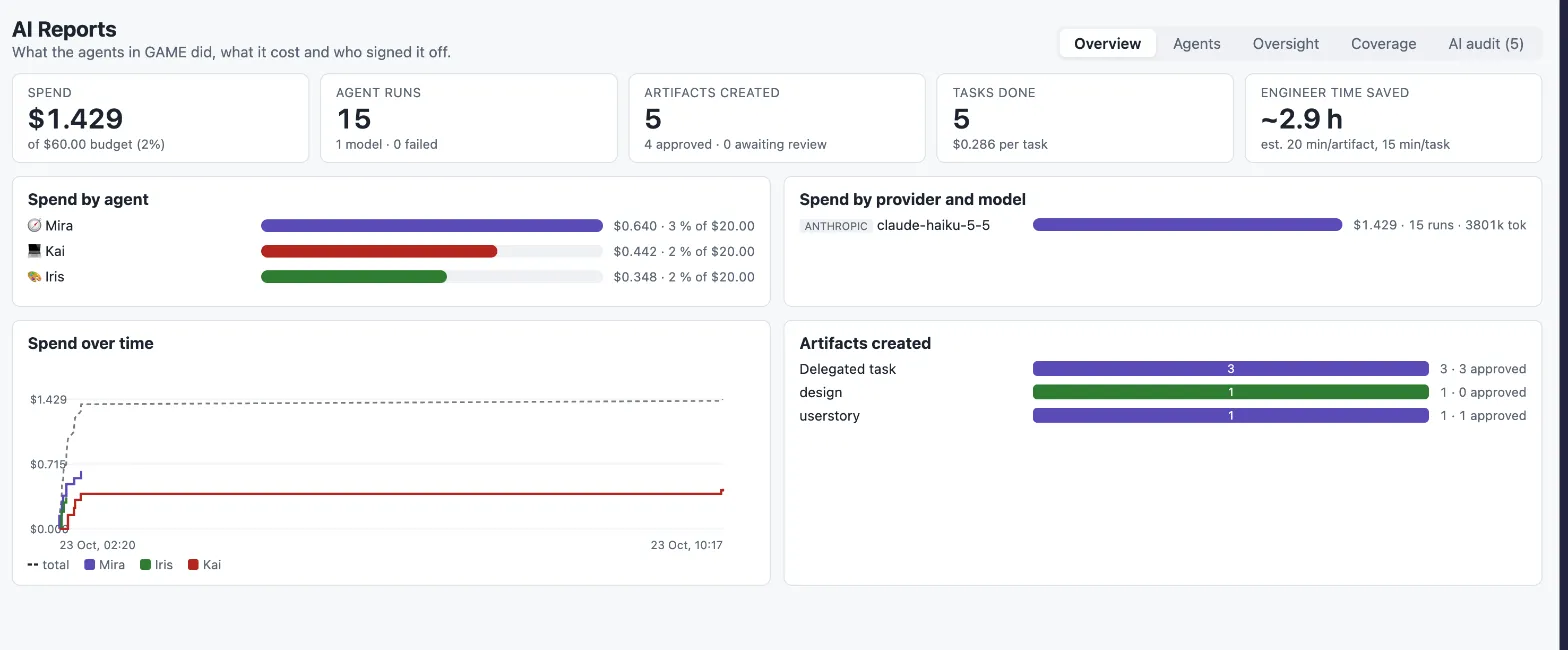
- Agent Team page: a ring per agent shows spent against budget; the team header shows the total.
- Agency → Agents: runs and spend per agent across all projects.
- AI Reports → Overview: spend against the project’s total budget, spend by agent, by provider and model, and over time.
- Agent Run items: model, tokens and cost of each single run.
Choosing budgets
Section titled “Choosing budgets”- Start small for a new agent or a new kind of work, and raise the budget once you have seen a few results.
- Larger models and long tasks cost more per run. The scorecard in AI Reports shows cost per agent and task, which helps you size budgets.
- A budget stop is a normal checkpoint, not an error. It is a good moment to look at what the agent did before you let it continue.